Sometimes the interesting findings aren’t the loud ones.
No crashes. No memory corruption. No clever exploit chains.
Just something that does exactly what it’s told to do… a little too well.
How this started
I was looking into xrdp — nothing particularly unusual, just spending some time understanding how sessions are created and managed.
At some point, I noticed the `AlternateShell` feature.
On paper, it makes sense. It allows a client to request a different shell or window manager when starting a session.Useful, flexible, and in line with how Linux systems tend to operate.
But then I started following how that value actually gets used. And that’s where things got interesting.
The subtle shift
What stood out wasn’t the feature itself, it was how the server handled it.
If a client provides an `AlternateShell` value, and the feature is enabled, xrdp doesn’t just select a different binary.
It executes the value using a shell.
const char \*argv\[\] = {"sh", "-c", sp->shell, NULL};
g_execvp("/bin/sh", (char \*\*)argv);
That one detail changes everything. Instead of “choose this program,” it becomes: “Take this string from the client… and run it as a shell command.”
No filtering. No validation. No restrictions.
Just straight into /bin/sh -c .
And then the second problem
At this point, you’d expect this kind of behaviour to be locked down behind an explicit configuration. Something you consciously enable.
But it isn’t.
sc->allow_alternate_shell = 1;
That’s the default.
Unless someone has explicitly disabled it in sesman.ini, it’s already on.
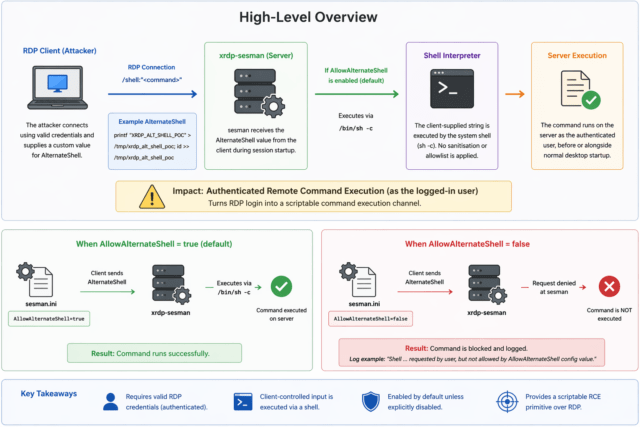
Visual overview
This diagram shows the full flow:
- Client supplies
AlternateShell
- Server accepts it
- It gets passed into
/bin/sh -c
- Command executes as the authenticated user
Why this actually matters
This is usually the point where someone says:
“Well, if the attacker has credentials, it’s game over anyway.”
That’s a comfortable answer, but it skips over something important. There’s a big difference between:
- Logging into a desktop session
- And having a clean, scriptable command execution channel
This behaviour quietly turns RDP into the latter. Instead of interacting with a GUI, an attacker can:
- Execute commands immediately during session startup Avoid any reliance on an interactive session
- Chain actions programmatically
- Treat RDP like a remote execution API
It’s not about whether code execution is possible. It’s about how easy, fast, and automatable it becomes.
A quick demonstration
To prove it out, I set up a simple test.
A Debian host running xrdp, and a client using FreeRDP.
With valid credentials, I supplied a shell command directly from the client:
xfreerdp /v:<SERVER_IP> /u:<USER> /p:'<PASSWORD>' /cert:ignore \
/shell:"printf '%s\n' 'XRDP_ALT_SHELL_POC' > /tmp/xrdp_alt_shell_poc; printf '%s\n'\"\$(id -u):\$(id -g)\" >> /tmp/xrdp_alt_shell_poc"
After logging in and disconnecting, the result on the server was exactly what you’d expect:
XRDP_ALT_SHELL_POC
1000:1000
The command came from the client. It was executed on the server.
And it ran as the authenticated user.
No tricks. No edge cases. Just intended functionality used in a way that probably wasn’t intended.
Just turn it off
When the feature is disabled:
AllowAlternateShell=false
The exact same attempt simply doesn’t work.
The server logs show it being rejected, and no command is executed.
That contrast makes it very clear: this behaviour is entirely dependent on that one configuration flag.
Where this fits in real attacks
This kind of issue doesn’t usually exist in isolation. It fits neatly into very real scenarios. Think about how breaches actually happen:
- Credentials get reused
- Passwords get phished
- Access is obtained quietly
Now imagine landing on a box with RDP exposed.
Instead of navigating a desktop, figuring out the environment, and manually executing actions, you can:
- Run commands immediately
- Drop files
- Establish persistence
- Pivot internally
All in a controlled, scriptable way. That’s a very different starting point.
Responsible disclosure
During disclosure, one of the points raised was:
“If credentials are stolen, the system is already at very high risk.”
That’s true, but it’s not the full picture.
Security isn’t just about access. It’s about capability.
This behaviour:
- Removes friction
- Enables automation
- Introduces shell interpretation of untrusted input
- Changes RDP from an interactive protocol into an execution channel
That’s a meaningful shift. And the fact that the default behaviour is now being changed reflects that.
Remediation
The fix itself is straightforward:
Set the default to:
AllowAlternateShell=false
Classification
- CVE: CVE-2026-33145
- Type: Authenticated command execution primitive
- Vector: Network (RDP)
- Privileges Required: Low
- Likely CWE: CWE-78 (OS Command Injection)
This wasn’t a complicated vulnerability.
No deep exploitation techniques. No obscure edge cases.
Just a small design decision:
Trusting client input, and passing it straight into a shell.
That’s all it takes and in the right context, that’s more than enough.
Lastly, I’d like to say thank you to the xrdp team for their support throughout the disclosure process it’s been a smoothand clear process and also great working with a project that I am personally fond of.
Discovered and responsibly disclosed by James ‘smittix’ Smith
Sources:
- https://github.com/neutrinolabs/xrdp/security/advisories/GHSA-rmvv-7633-fg7h
- https://nvd.nist.gov/vuln/detail/CVE-2026-33145